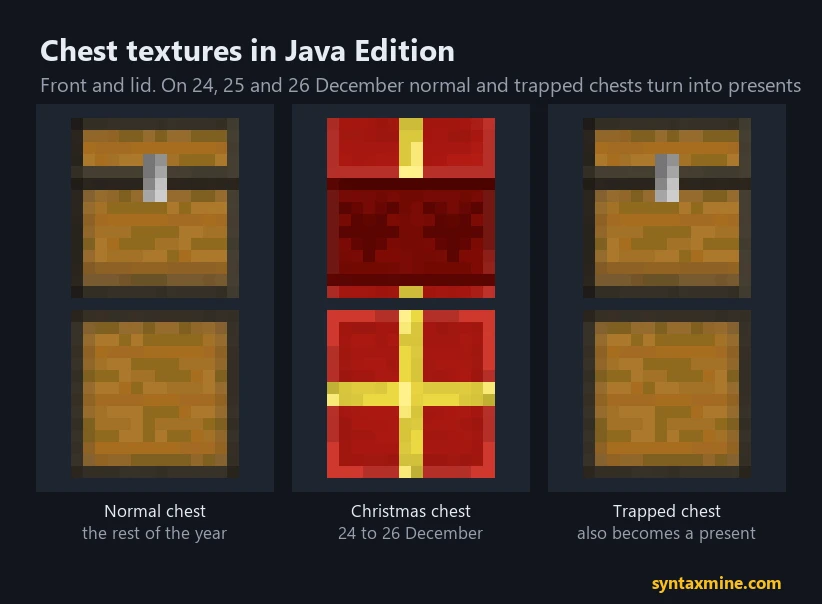
Minecraft Java Edition turns chests into Christmas presents on 24, 25 and 26 December. Normal chests, double chests and trapped chests all get a red wrapping with a gold ribbon. The date comes from your own computer's clock, not from the server, and Bedrock Edition has no Christmas chests at all.
Rate24, 25 and 26 December
XP levelJava Edition only
Build timeSince 1.4.6 (2012)
DifficultyBeginner
Quick answers
- Dates: 24, 25 and 26 December. We checked the game code of 26.3: the Christmas range is exactly those three days, and nothing else.
- Whose clock: the date on the computer running the game. On a server, every player sees presents according to their own clock.
- Which chests: chests, double chests and trapped chests, both placed and in your inventory.
- Which do not change: ender chests and copper chests.
- Bedrock: no Christmas chests.
Which chests turn into presents
The game picks a chest's texture in a fixed order. Copper chests always keep their copper look, at every stage of oxidation. Ender chests always stay ender chests. Then comes the Christmas check, and only after that the check for trapped chests. That order has a side effect:
From 24 to 26 December a trapped chest looks exactly like a normal one. The faint reddish marks that normally give a trapped chest away are gone, because both use the same present texture. If you like pranks, this is the one weekend a year a trapped chest is invisible.
The chest item changes too. The item's model checks the date 12-24, 12-25 or 12-26 in your local time, so chests in your hotbar and in creative show as presents on those days.
Why your chests did not change at midnight
Items switch straight away, but placed chests check the date when the game loads its resources: when you start Minecraft or reload resource packs. If you are playing through midnight on 23 December, the chests around you stay plain.
To fix it, press F3 + T. That reloads the resources, and placed chests pick up the present texture. Restarting the game does the same. The same is true in reverse on 27 December: a game that has been running since Boxing Day keeps the presents until you reload.
How to get Christmas chests all year
Option 1: a resource pack
Christmas Chests All Year on Modrinth swaps every chest for the present texture permanently and adds a few new designs. It is listed for 26.3. Install it like any other pack; our resource pack install guide covers the folder for each operating system.
Option 2: make the pack yourself in two minutes
The present texture already ships inside the game, so you can point the normal chest at it:
- Make a folder called
ChristmasChests in your resourcepacks folder.
- Inside it, create
pack.mcmeta with this content:
{
  "pack": {
    "description": "Christmas chests all year",
    "min_format": 97,
    "max_format": 97
  }
}
- Open
.minecraft/versions/26.3/26.3.jar with 7-Zip or any zip tool and go to assets/minecraft/textures/entity/chest/.
- Copy
christmas.png, christmas_left.png and christmas_right.png into ChristmasChests/assets/minecraft/textures/entity/chest/.
- Make a second copy of each and rename them so you have
normal.png, normal_left.png, normal_right.png, and the same three for trapped.
- Enable the pack in Options, Resource Packs.
The _left and _right files are the two halves of a double chest. Format 97 is the resource pack format for 26.3; on another version, the game shows a warning but usually still loads a pack this simple.
Option 3: change your computer's date
Setting your system date to 24, 25 or 26 December works, because the game only reads the computer's clock. We do not recommend it: other programs, browser certificates and file timestamps rely on the date too. A resource pack is cleaner.
How to turn Christmas chests off
Some players find presents confusing in a storage room, especially with trapped chests in the mix. No More Christmas Chests on Modrinth keeps chests looking normal on those three days, and it is listed for 26.3. You can also build it yourself the same way as above, copying normal*.png and trapped*.png over the christmas*.png files.
Bedrock Edition
Bedrock has no Christmas chest. If you play on console or mobile and want the look, you need a resource pack from the Marketplace or a third-party source; the Java texture trick above does not apply to Bedrock packs.
A short history
Mojang added the present textures in Java 1.4.6, in December 2012, as a Christmas easter egg. They have come back every year since. Ender chests have never had a Christmas version; mods like Hendrix's Better Christmas Chests add one if you want it.
Frequently asked questions
When do Minecraft chests turn into presents?
On 24, 25 and 26 December, according to the clock of the computer running the game. Placed chests switch when the game loads its resources, so press F3 + T if you were already playing at midnight.
Do Christmas chests work on Bedrock?
No. Christmas chests are a Java Edition feature only.
Do trapped chests turn into Christmas chests?
Yes. From 24 to 26 December trapped chests use the same present texture as normal chests, so you cannot tell them apart by looking.
How do you get Christmas chests all year?
Use a resource pack such as Christmas Chests All Year, or make one by copying the game's christmas chest textures over the normal and trapped chest textures.
Do ender chests get a Christmas texture?
No. Ender chests and copper chests keep their usual look on Christmas.


Comments
Loading...